12 Best Digital Business Card Apps of 2024 (Free & Paid)
We’ve all been there — stuffing business cards into our pockets and wallets, only to have them get worn, bent out of shape, or lost. Luckily, technology has come to the rescue with digital business cards.
The thing is, they’re not only more convenient than the traditional paper version. They can also really jazz up your personal brand.
It doesn’t matter whether you’re a solo photographer hustling for clients, a real estate agent wooing homebuyers, or part of a sales team pitching to potential customers. A well-designed digital card helps you stand out from the pack.
In this guide, I’ll walk you through the top digital business card apps on iPhone and Android so you can find the right fit. I’ll call out the features, pricing tiers, and other good-to-know details of each option.
I’ll also share some examples of digital cards I’ve created for my brand for inspiration. Further down, you’ll discover some additional resources to help in your transition from paper to digital.
My hope is that by breaking down the options, you’ll feel confident selecting the app that works best for your needs out in the real world. Soon those easy-to-lose and worn-out business cards will be a thing of the past!
Disclaimer: Because the site is reader-supported, we may earn a commission if you use our affiliate links. More info here.

Popl
(Best for Team Digital Business Cards)
Popl is my top recommendation for creating a digital business card and linking it to an NFC product.

Beaconstac
(Best for QR Code on Business Cards)
You can make a unique digital business card on Beaconstac that has a classy QR code for easy sharing.

mTap
(Best for Offline QR Code Scanning)
mTap is among the top apps to create digital business cards with an offline QR that also offers NFC products.
What Is the Best Digital Business Card?
Below are my picks for the top digital business cards for individuals and businesses that you need to check out.
1. Popl
(Best for Team Digital Business Cards)
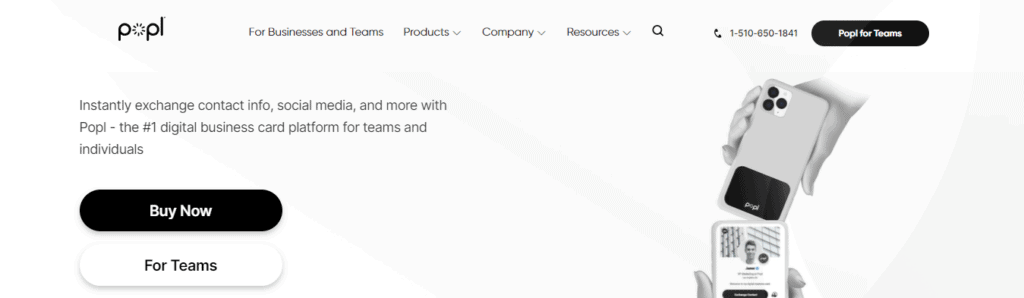
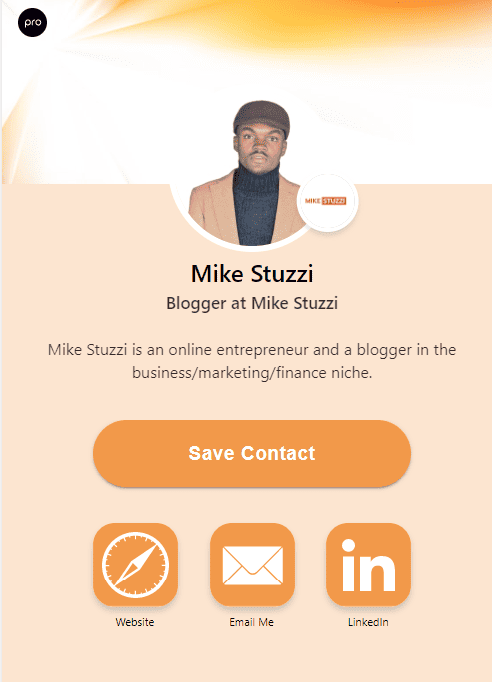
Popl is among the best digital business card apps that combine advanced features with thoughtful design. I found that it allows you to create beautiful digital business cards with custom designs for you and your team, like the one I created for myself below:
The app (available for Android and iPhone) provides access to powerful contact management and analytics tools. You can track who has looked at your card, where they are located, and how often they view it.
Popl also offers the ability to manage multiple accounts at once. You can instantly switch between them depending on your needs.
Aside from sharing your card profile online, you can get yourself an NFC-embedded Popl product like a metal card or tag, and connect it to your account. In your networking efforts, you’ll just tap it on recipients’ phones to instantly share your profile.
Also, there are custom PopCodes (advanced QRs on Popl cards and other products) that stay forever!
Check this quick video of how to share a Popl card on iPhone (works on Android too):
Read the full Popl business card review.
Popl Features, Pros, and Cons
✓ Offers a wide variety of NFC-enabled products for in-person sharing by tapping
✓ 1,000+ CRM integrations, including Zapier and HubSpot
✓ Contact management
✓ Lead Capture Mode
✓ Access to analytics
✓ Multiple sharing options, including Advanced QRs (PopCodes) and NFC
✓ Automated follow-up that sends an email to your new connections
✗ The free version of Popl has limited features
Popl Pricing
Popl’s free plan offers basic features while the paid plans unlock more.

- Free ($0/month): 1 unique digital business card
- Pro ($7.99/month): 14-day free trial and 3 unique digital business cards
- Pro+ ($14.99/month): 14-day free trial and unlimited unique digital business cards
- Teams (Dynamic pricing): 30-day free trial and unlimited unique digital business cards and members
2. Beaconstac
(Best for QR Code Business Cards)

Beaconstac is a comprehensive professional digital business card solution for small businesses and large organizations or enterprises. Trusted by companies like Amazon, Nestle, and Marriott, it lets you create a customized and interactive digital card with your basic contact details, social profiles, and more.
Here’s a quick view of my Beaconstac digital business card:
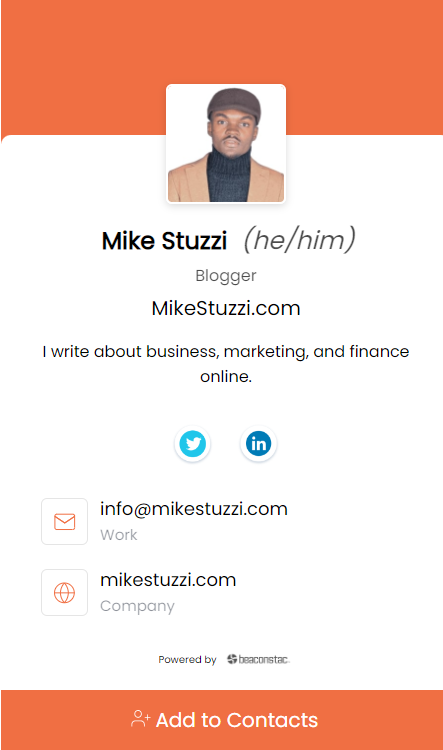
With Beaconstac’s digital business cards, you can also embed links to products or services. Best of all, the platform can be integrated with existing CRM systems so that customer data can be stored in one place.
Besides electronic cards, Beaconstac can do even more for your business. The platform allows you to create QR codes for PDF files, URLs, apps, and landing pages.
It allows you to have QR codes on both digital and physical business cards. Customers can instantly scan either of the two to get your contact details.
Beaconstac digital business card is editable, meaning you can change the information anytime with ease. Also, the card is trackable and can be added to your Google Wallet (or Apple Wallet). No app is needed by the recipient as everything opens in a browser.
Beaconstac Features, Pros, and Cons
✓ Highly customizable digital business cards
✓ Google Wallet business card
✓ Dynamic QR codes
✓ Integrates with 5,000+ CRM and HR tools
✓ Bulk card management
✓ Scan data analysis
✗ Beaconstac doesn’t offer NFC products
Beaconstac Pricing
First-time users on Beaconstac get a free trial to create digital business cards and track analytics for 14 days at no cost. The plans are listed below:
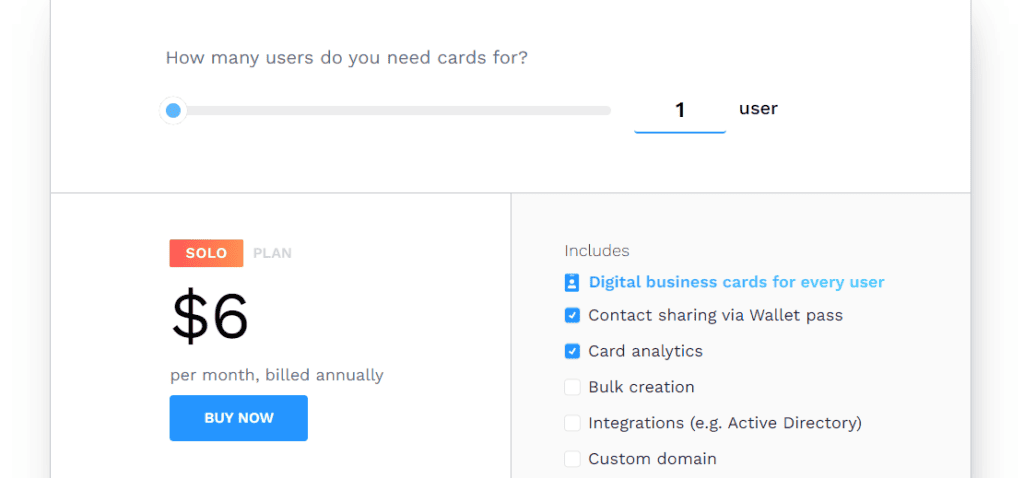
- Solo ($6/month billed annually): 1 digital business card user
- Team ($50/month billed annually): 10 digital business card users
- Business ($200/month billed annually): 50 digital business card users
- Enterprise (Custom pricing): 250+ users and unlimited digital business cards
3. mTap
(Best for Offline QR Code Scanning)
Need a contactless business card with a custom domain for prospecting and converting leads into customers? If so, mTap may interest you.
One of the things that make this platform stand out is its available customizable options. You can choose the look of your digital profile from 5 different layouts that combine colors that blend into each other. Besides your basic contact information, you’re able to include a short bio that will appear alongside your social media pages and other links.
I tested mTap’s digital business card creation abilities and here’s the result:
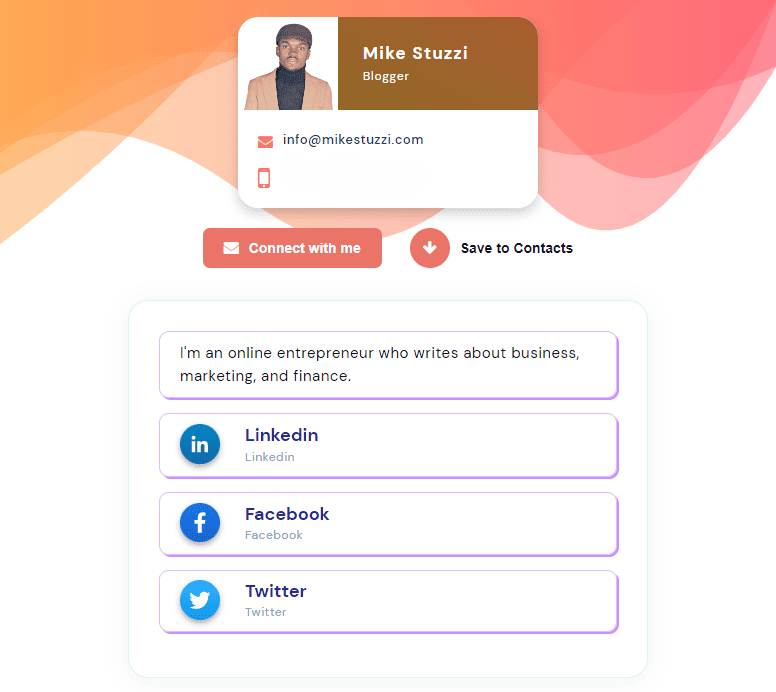
This platform is among the top ones when it comes to ease of sharing. Even when there’s no Internet, people can still scan your digital card and save details like your Google Maps location link through an offline QR code generated for you.
Similar to the likes of Popl, mTap also offers a variety of NFC-enabled products, including custom cards. What this means is that you can order an mTap card that enables you to share your profile by just tapping it on someone’s phone.
mTap Features, Pros, and Cons
✓ 4 ways to share, including tapping, scanning, as well as online and offline QR codes
✓ Multiple digital profiles whereby you can select the primary one that opens up during networking
✓ Automated follow-up that sends a message or email to your new connections
✓ Multiple ways to save new mTap contacts, including business card scanning, manual entry, and exporting from mobile contacts
✗ mTap’s free version doesn’t give you full access
mTap Pricing
There are plans for individuals as well as business plans for teams on mTap.
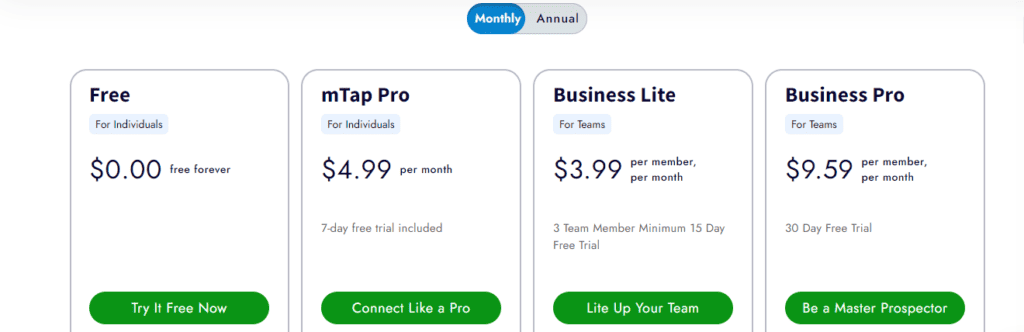
- Free ($0/month): Easy profile setup for individuals
- mTap Pro ($4.99/month): 7-day free trial and offers up to 3 profiles
- Business Lite ($3.99/member/month): 15-day free trial and offers company profiles with QR codes
- Business Pro ($9.59/member/month): 30-day free trial and offers unlimited department and group profiles with lead forms and QR codes
4. Linq
(Best for Business Card Scanning)
Among the list of the top digital business cards for iPhone and Android in today’s networking is Linq. With this platform, you’re able to create an entirely personalized profile that contains any detail you need to share, including contacts, links, and photos.
The information will go directly to their phone without them needing to be Linq users themselves. This brings me to the different ways you can share your digital Linq card, which are QR codes and NFC technology.
Remember, Linq allows you to create a profile that you can quickly link with a Linq product like a metal card. Someone can either scan your Linq product to view your card profile online or simply tap on it.
Linq Features, Pros, and Cons
✓ A wide variety of Linq products, such as cards, tags, and bracelets
✓ 380+ CRM integrations, including Zapier, Zoho, and Salesforce
✓ Team administration features such as the ability to oversee member profiles and share contact details across all members
✓ Business card scanner to convert traditional paper business cards to digital contact details
✗ Haystack doesn’t offer NFC products
Linq Pricing
You can use Linq for free or select its business plan for multiple members.

- Linq Free ($0/month)
- Linq Pro ($6.99/month)
- Linq for Teams (Custom pricing)
5. HiHello
(Best for Branded Digital Business Cards)

HiHello is a digital business card app that helps professionals create and share custom cards with their new connections on Android, iPhone, or computer. The cards can include anything from your name, title, and company logo to your office location or virtual business address.
What makes HiHello unique is its focus on branding. You can customize your card to best suit your individual or business preferences. Besides your preferred name, you can select your pronouns and applicable accreditations for the card.
The Hihello digital business card can also contain your picture, a live photo or video, or a company logo. The platform also offers not just one but several templates that you can use to create cards quickly.
The people you share your contactless card with don’t need to have HiHello. Sharing can be done through a QR code, text, email, social media, or link, among other methods.
As if that’s not enough, HiHello allows you to transform your card into a virtual background with a QR code for online meetings on Zoom, Microsoft Teams, and Google Meet. Anyone who aims their phone at the code during a call can access your digital business card!
HiHello Features, Pros, and Cons
✓ Branded digital business cards
✓ Live photos and videos
✓ Various sharing methods
✓ Automated follow-up that sends a message or email to your new connections
✓ Email signature linking to your card
✗ HiHello doesn’t offer NFC products
HiHello Pricing
You can use HiHello’s free version with basic features or the paid options depending on your needs.
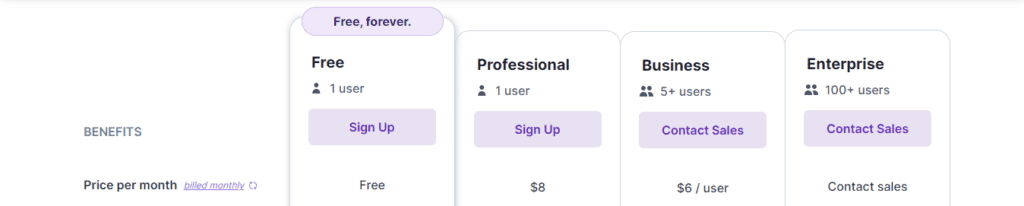
- Free ($0/month): 4 different digital business cards
- Professional ($8/month): 1 user and unlimited digital business cards
- Business ($6/user/month): 5+ users and unlimited digital business cards
- Enterprise (custom pricing): 100+ users
6. Mobilo Card
(Best for Switchable Business Cards)
Next on the list of the best digital business cards for iPhones and Android smartphones is Mobilo Card. This virtual business card maker also provides detailed analytics on who received and viewed your digital cards.
Mobilo Card is ideal for individuals as well as large companies, allowing everyone to track which contacts viewed their paperless cards. So, professionals like sales reps, recruiters, and coaches can use it to stay organized and make sure that prospective customers are interacting with their cards.
What makes Mobilo’s digital business cards interesting is that they’re switchable. What this means is that you can switch between four different modes depending on the occasion. These modes are Business Card (shares contact info), Landing Page (business page people can visit), Lead Generation (sends leads to your CRM), and Link to any URL.
For instance, if you’ve moved from meeting a potential business partner to a networking event with prospective clients, you can switch from Business Card to Lead Generation mode.
Read the full Mobilo Card review.
Mobilo Card Features, Pros, and Cons
✓ Detailed analytics to know ROI from your networking efforts
✓ 4 switchable business card designs
✓ CRM integration with 3,000+ platforms
✓ Unique email signatures
✗ You need to buy a Mobilo Card NFC product to get started with the platform
Mobilo Card Pricing
The digital business card prices on Mobilo vary for personal and team use. Personal requires a one-time payment while Teams require an annual fee per employee plus a one-time payment per card.
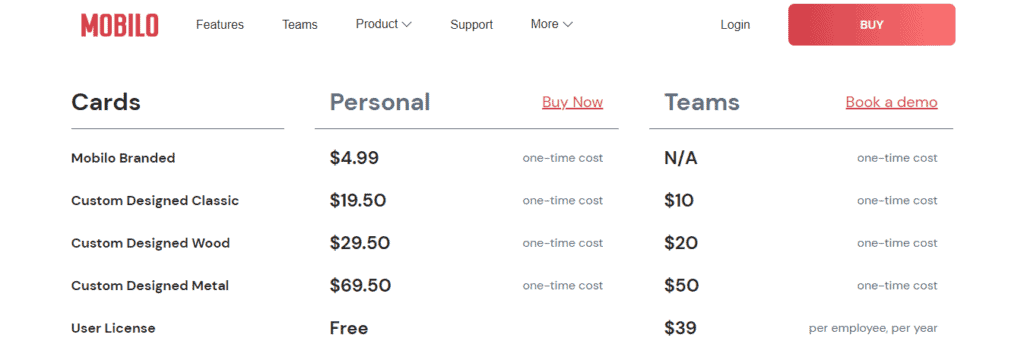
Personal:
- Mobilo Branded: $4.99 one-time
- Custom Designed Classic: $19.50 one-time
- Custom Designed Wood: $29.50 one-time
- Custom Designed Metal: $69.50 one-time
- User License: Free
Teams:
- Mobilo Branded: Not available
- Custom Designed Classic: $10 one-time
- Custom Designed Wood: $20 one-time
- Custom Designed Metal: $50 one-time
- User License: $39 per employee per year
7. Blinq
(Best for NFC Business Cards)
Blinq is a digital business card platform that allows you to customize your online profile and even link it with NFC cards. The card you get is dynamic and contains your headshot and logo. You can, at any time, update your card in case new information comes up, like career developments, an updated logo, or something else.
Blinq offers slick design templates that can quickly impress anyone’s eye and make them want to connect more with you. It also allows you to instantly share your cards via QR code, LinkedIn, or email.
The NFC card feature allows you to pair your Blinq digital business card with a physical NFC one. When someone opens your card, they see an option to save your contacts instantly on their Android or iPhone device. No more entering things manually!
Also, Blinq’s memorable feature captures details of when and where you exchanged a digital business card. You can even add some key notes about your new contact or customer for future reference.
Blinq Features, Pros, and Cons
✓ QR-code-powered custom digital business card
✓ Blinq offers NFC cards
✓ Automatic time and place logging of new contacts
✗ Only offers NFC business cards and no other products (such as phone tags and key fobs)
Blinq Pricing
There’s a free plan on Blinq and also paid subscriptions.

- Free ($0/month): Up to 2 different digital business cards
- Premium ($3.99/month): 7-day free trial and 5 different digital business cards
- Business ($3.99/card/month): 30-day free trial, 3 card minimum, and unlimited digital business cards
- Enterprise (Custom pricing): Access to bulk creation feature
8. Haystack Digital Business Cards
(Best for Unlimited Digital Business Cards)
Haystack is a digital business card app that provides a convenient and effective solution for individuals and small businesses to promote themselves to potential customers and partners. With Haystack, you’re able to create custom, interactive, and contactless business cards that include links to your social media profiles, websites, and more online content like digital reports.
One of the key benefits of Haystack is that it allows you to make a mobile business card that aligns with your personal or business branding. The platform provides a variety of customizations, including different templates, colors, and fonts. It becomes simple to create business cards that portray your unique style and improve your brand perception.
Haystack also focuses on being user-oriented without any technical difficulties. Creating a business card on the platform is a straightforward process that anyone computer savvy can complete in just a few minutes. As soon as your business card is ready, you can share it via email, text message, or QR code.
Another benefit of Haystack is that usage analytics are accessible to you. You’ll know how many people are viewing and engaging with your business cards. This information can help you measure the effectiveness of your marketing efforts and make improvements as needed.
Haystack Features, Pros, and Cons
✓ Fully-customized card templates
✓ Hundreds of integrations with CRM and business tools like Hubspot, Mailchimp, and Slack
✓ Dashboard and analytics to track client engagement and usage
✓ You get unlimited cards even in the free version
✗ Haystack doesn’t offer NFC products
Haystack Pricing

- For individuals ($0/month)
- For Business ($7.95/month)
- For Enterprises (Custom pricing)
9. Switchit
(Best for Video Embeds)

The Switchit Android and iPhone app comes with powerful features for creating visually appealing digital business cards. You can benefit from Switchit’s virtual cards when it comes to one-on-one connections with people in your workplace or during various events.
Switchit is great for adding videos to your contactless business card. If you’re selling products or services, you get to showcase them and give potential buyers an interactive prepurchase experience virtually.
Switchit Features, Pros, and Cons
✓ Video integration where you can add demos, explainer videos, and promo videos, among others
✓ Share your mobile business cards online via messaging or using a QR code
✓ Convenient contact manager that allows for calling and texting leads from the Switchit app
✗ Switchit doesn’t offer NFC products
Switchit Pricing

- Free ($0/month): 4 digital business cards
- Premium ($6.99/month): Unlimited digital business cards
- Business (Custom pricing): Digital business cards for teams
10. KADO Networks
(Best for Relationship Management)
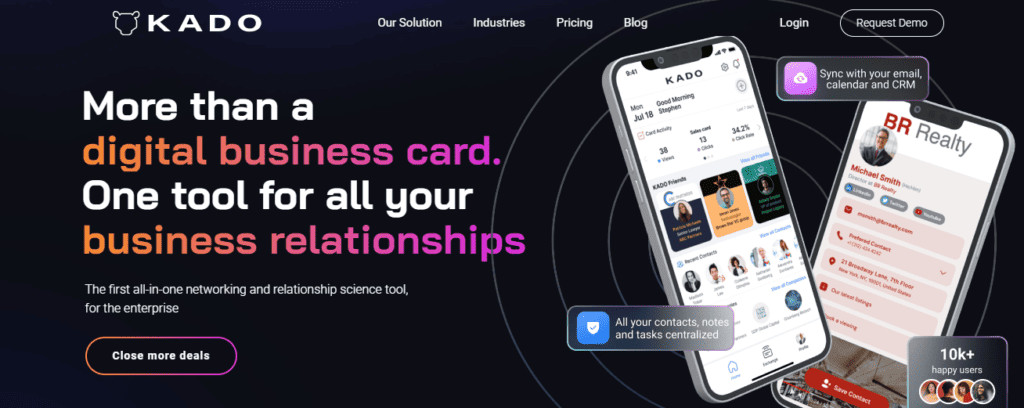
You may want a digital business card app that does more for your networking. KADO Networks enables you to close more deals with its relationship management capabilities.
With KADO Network’s easy-to-operate interface, you’re able to capture business contacts, import even more, and manage everything in one central place. It doesn’t matter whether you need to build meaningful connections with prospects, partners, or even your colleagues.
KADO Networks Features, Pros, and Cons
✓ Record notes and never forget key details about your prospects
✓ Connect your calendars, emails, and CRMs
✓ Access important LinkedIn info of new contacts
✗ KADO Networks doesn’t offer NFC products
KADO Networks Pricing
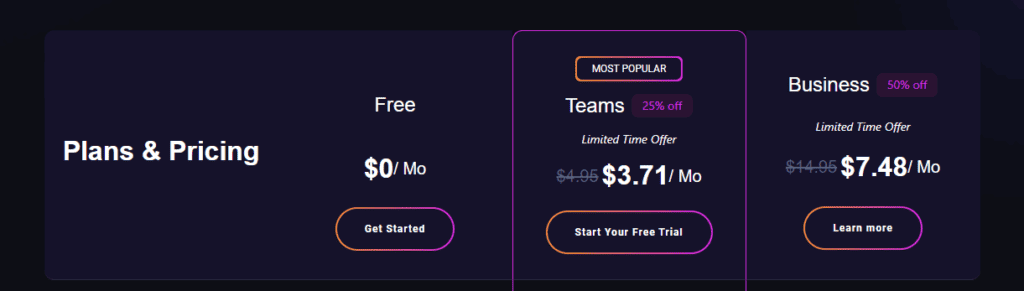
- Free ($0/month)
- Teams ($3.71/month)
- Business ($7.48/month)
11. L-Card
(Best for Attaching Documents)

If you need another solution for unlimited digital business cards, L-Card is worth your consideration. It enables you to connect and communicate with other professionals and clients while marketing yourself.
With L-card’s digital business card creation abilities, you can have everything you need on the card, including your background, logo, fonts, images, and colors. You get access to a template library with different themes and formats that align with your company’s identity.
You can also share your calendars, scan paper business cards to save the information, and get a custom QR code for online meetings and banners. L-Card also makes it possible to add your business card to your email signature.
L-Card Features, Pros, and Cons
✓ Calendar sharing for Calendly, Zoo, Google, and more
✓ Card scanner that enables you to save contact details from physical cards
✓ Ability to add personalized messages like taglines, bios, and mission statements
✓ File attachment capabilities for catalogs, presentations, brochures, and other documents
✗ L-Card doesn’t offer NFC products
L-Card Pricing
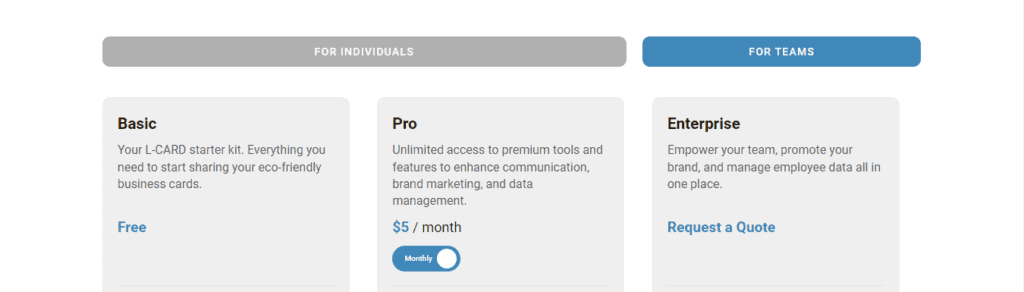
- Free ($0/month)
- Pro ($5/month)
- Enterprise (Custom pricing)
12. Canva
(Best for Custom Digital Business Cards)
Canva is a graphic design platform that provides a wide range of tools and resources for beginners and established businesses to create professional-looking designs, including virtual business cards. With Canva’s digital business card maker, you can create a custom business card that speaks highly about your brand.
I even went ahead to create a simple one, as shared below:

Canva is user-friendly and all you need to do is drag and drop elements. You can access a variety of customizations such as templates, images, design elements, icons, and texts.
All these elements allow you to design a proper-looking business card in just a few minutes. You can also upload your own images and logos to further personalize your business cards.
What’s even more, the platform provides different size selections so your business card isn’t only attractive but also functional. Whether you need a business card in portrait, landscape, or square shape, Canva has you covered.
Canva Features, Pros, and Cons
✓ Library with millions of images and elements to design your business card
✓ Wide variety of customizations
✓ Ability to print your digital business card onto a paper
✗ Canva isn’t really a digital business card platform but rather a card maker, meaning that there’s no contact management, analytics, or NFC products offered
Canva Pricing
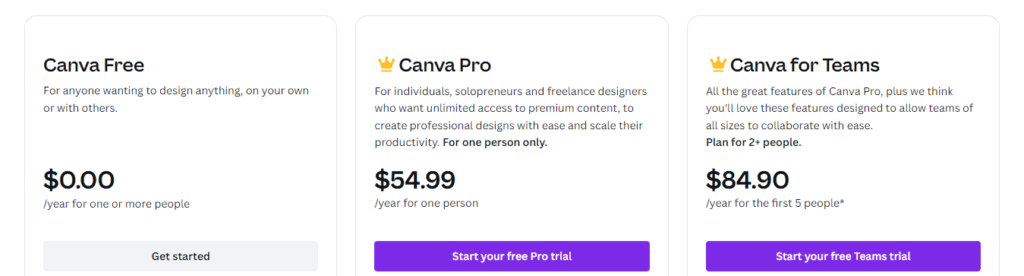
- Free: $0/year
- Canva Pro: $54.99/year
- Canva for Teams: $84.90/year for the first 5 people
Digital Business Card Apps Pricing Comparison Table
| Digital Business Card App | Free Plan? | Lowest Monthly Pricing |
| 1. Popl | Yes | $7.99 |
| 2. Beaconstac | No | $6 |
| 3. mTap | Yes | $4.99 |
| 4. Linq | Yes | $6.99 |
| 5. HiHello | Yes | $8 |
| 6. Mobilo Card | No | N/A |
| 7. Blinq | Yes | $3.99 |
| 8. Haystack | Yes | $7.95 |
| 9. Switchit | Yes | $6.99 |
| 10. KADO Networks | Yes | $3.71 |
| 11. L-Card | Yes | $5 |
| 12. Canva | Yes | $54.99/12 months |
What Is a Digital Business Card?
A digital business card is an electronic version of the good old physical business card made of paper. You may also come across other names that mean the same thing.
These alternative names include electronic business cards, e-business cards, contactless business cards, paperless business cards, or virtual business cards.
A digital business card usually consists of all the same information that you would put on a physical card. That includes your full name, company name, contact information, and brand logo.
However, these digital alternatives can also include other interactive features such as viewable media and social media links, a personal or company website address, and any individual landing page URL. The cards are usually stored, managed, and shared virtually via mobile apps, email, or instant messaging.
You can also link the digital card profile to a QR code or NFC-embedded card for physical (but contactless) interactions. In just a few clicks, the recipient can instantly access your details online.
What to Consider when Choosing a Digital Business Card Solution
When choosing the best digital business card app for you, there are several things to keep in mind to ensure it meets your personal or business needs. Below, you’ll find a list of some of the key factors to consider:
- Customization options: You want a digital card app that lets you truly make the card your own. There’s some fun in designing a card to reflect your unique personal style or company brand.
- Ability to carry enough information: The basics like your name, title, company name, and contact details are a must. But don’t be afraid to add a little extra personality too, like your areas of expertise, or even a fun fact about yourself.
- Social media integration: If you like networking on social media, look for a card that lets you link your Facebook, Twitter, LinkedIn, or more profiles. That way, when people receive your card, they can instantly follow or connect with you on their preferred platforms.
- Multiple sharing options: When sharing your digital card, you need effortless options. Look for a solution that allows easy exchange through email, text messages, quick QR scans, or even NFC (as in NFC digital business cards).
- Access to analytics: A digital business card that provides analytics and tracking features is the best. Tracking high-level metrics like views, clicks, and shares can help optimize your networking and lead-generation approach over time.
What are the Benefits of a Digital Business Card?
Digital business cards provide tons of advantages to businesses and professionals alike. From creating an interactive experience for customers to increasing the response rates from prospects, the benefits are endless.
Here are some of the main advantages of using digital business cards:
- Easy accessibility: Digital business cards can be easily shared and accessed from anywhere with just a few clicks. A phone, something that grew to become part of us, is all that’s needed.
- Increased response rates: Unlike paper cards that easily get lost or thrown away, electronic business cards enable recipients to save your information immediately, increasing the chances of getting in touch.
- More reach: By sharing your virtual business card on text, social media, or email, you can reach a much larger audience than with a paper card (which is more localized).
- Better engagement: When compared to physical business cards, digital ones allow for more interactive content and can be updated on the go. Recipients can view your photos and videos, open documents, and click on links.
- Cost-effective: You would need to print paper business cards to be able to distribute them. Digital cards save money for you because they don’t require initial production and reprinting costs when your info changes.
- Environmentally friendly: Digital business cards are a more sustainable alternative to physical business cards as they don’t require cutting down trees. You design, manage, and share them digitally.
Digital Business Cards FAQs
Are Digital Business Cards and NFC Business Cards the Same?
Digital business cards and NFC business cards are often used interchangeably, but there is an important distinction between the two. Digital business cards refer to online profiles that contain your contact information.
That includes your name, phone number, email, social media links, and company details. These digital cards can be viewed, shared, and stored digitally.
NFC, or near-field communication, business cards are a type of digital business card that utilizes NFC technology. The technology allows for contact details to be automatically transmitted between two NFC-enabled devices like smartphones when they are physically tapped together or brought within proximity.
So while all NFC business cards are considered digital business cards due to their digital nature, not all digital business cards have the NFC functionality that enables the seamless, one-tap contact exchange between compatible devices.
NFC business cards provide a quicker and easier sharing experience compared to manual entry but require two NFC-supported devices, whereas simple digital cards can be accessed using any smartphone or computer.
Are Digital Business Cards Worth it?
Yes, digital business cards offer numerous advantages over paper ones and can be extremely beneficial for businesses and individual professionals. They have a much higher lead conversion rate than traditional business cards, are more cost-effective, and allow for more interactive content like clickable links, files, and documents.
If you go digital, you’ll be protecting the environment too! All you do is send your card profile through the Web and not have to print anything.
Other than that, you would just need to carry one printed (but digitalized) card that has a QR or NFC technology for scanning or tapping to share your information. No distribution of tens of paper cards!
What Is the Best Way to Share a Digital Business Card?
When sharing online, you’ll find the easiest methods are through email, texts, and posting to social networks. That way people can connect at the push of a button from anywhere.
You should also include your digital card in signatures and newsletters to make it effortless for contacts to store your information right from your conversations.
In real-life interactions, a QR code (scanning) or NFC (tapping) provides a seamless exchange too. With just a quick scan or touch, new connections will have your details in hand.
It’s about meeting people where they are – whether on a device or face-to-face. The more intuitive the sharing process, the likelier they are to follow up later down the line.
Is There a Free Digital Business Card Platform?
Many digital card providers offer free basic accounts, which you’ll find can help experiment without commitment. Services like HiHello, Blinq, and Popl let you build a single card that you can customize and share as you wish.
However, depending on your needs, the free tiers may be too restricted. Maybe you need to network efficiently and glean insights from your interactions.
Stepping up to a paid plan unlocks much stronger functionality. You’re able to track engagement across multiple profiles, analyze team effort, and sync all activity to your customer database through CRM integrations.
Conclusion
If you’re someone who works to build new connections every day, having the right tools is so important. Digital business cards have truly changed the game by allowing you to share your info with ease from anywhere in the world.
No matter if you’re meeting people in the USA, the UK, Australia, or India, with a few taps or scans, they have your details safely in their pocket. Platforms like Popl make it a breeze to put together a polished, professional-looking card you can feel proud sharing.
At the end of the day, it’s all about finding the most eligible digital business card app that fits your budget and lead generation needs. So, make sure to compare the features and prices of each card before settling on a particular option.
More about digital business cards is covered in the following additional resources: